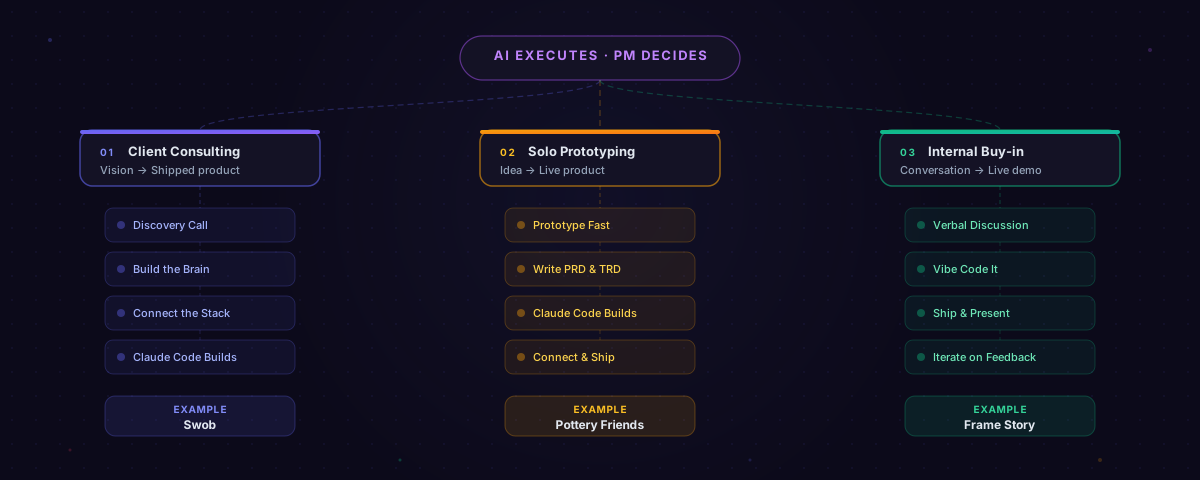
Every product on this portfolio was built with AI. Not "AI-assisted" in the way people usually mean, where you ask ChatGPT to draft a PRD and then clean it up. I mean the entire product: frontend, backend, deployment, analytics. Built by me and an AI coding agent working in tandem.
This post breaks down exactly how that works. I use three distinct workflows depending on the context: who I'm building for, what the constraints are, and how much ambiguity exists. The tools shift, but the core principle stays the same: AI handles execution, I handle judgment.
Workflow 1: Client Consulting
This is for clients who know roughly what they want but need help turning a vision into a real product. They have a business idea, maybe some competitors they admire, and a general sense of direction. My job is to extract the right requirements, build a knowledge base, and then let AI do the heavy lifting on implementation.
It starts with a discovery call. I record the session with Fireflies, which auto-generates a transcript. I run that call like a PM interview: who are the target users, what pain points are we solving, what does success look like, what are the non-negotiables on design and functionality. The client talks. I listen and probe.
Then I give them homework. I ask them to identify competitors they like and don't like, define their goals, and articulate their mission. This forces clarity before a single line of code gets written. Most clients haven't done this rigorously, and the exercise always surfaces assumptions they didn't know they had.
Next, I build the brain. I compile everything, the transcript, the homework, my own notes, into NotebookLM as a central knowledge repo. Then I set up Notion as the single source of truth: product docs, strategy, branding guidelines, design specs. Notion connects directly to Claude Code via MCP, so the AI agent can reference any document while it builds.
I collect assets and review. Logos, fonts, images, brand colors, Figma files, whatever the client has. I read through the generated docs line by line to make sure the AI and I are aligned on what we're building. This step seems tedious but it prevents expensive rework later.
Then I connect the stack. I wire up all the MCPs: Figma for design references, Supabase for the backend, GitHub and Vercel for deployment, PostHog for analytics. These connections mean Claude Code isn't building in a vacuum. It can pull design tokens from Figma, query the database schema, and push code to production.
And then I build. Claude Code works against all those artifacts, the docs, the designs, the brand guidelines, and builds the full product. Notion tracks tasks in real time so the client can follow progress. I'm making product decisions throughout: what to cut, what to prioritize, where the AI's output needs a human eye.
I used this workflow to build Swob, where I delivered 5 working prototypes as investor demos and living specs for the founding team. The client didn't get mockups. They got clickable, deployed products.
Workflow 2: Solo Rapid Prototyping
This is my personal workflow. I'm the PM, the designer, and the developer. There's no client brief. There's a problem I've experienced firsthand or spotted in a community, and I want to build something that solves it. Speed of iteration is everything.
It starts with an idea. No formal discovery. No stakeholder interviews. Just a problem that bugs me enough to build for it. With Pottery Friends, I noticed pottery studios had no good way to manage their community, communicate events, or share member work. That was enough to start.
I prototype fast. I build a front-end prototype directly in Claude or ChatGPT. Not wireframes, an actual clickable prototype. I iterate on layout, flow, and feature scope, sometimes doing dozens of cycles in a single day. The prototype isn't production code. It's a thinking tool. It forces me to make decisions about information architecture and user flow that a PRD never would.
Once the prototype is solid, I write the docs. A Product Requirements Doc and a Technical Requirements Doc. These go into the project folder alongside the prototype. Some people write docs first and build second. I do the opposite. Building first means my docs describe something real, not something imagined.
Claude Code builds the real thing. It reviews all artifacts, the prototype, the PRD, the TRD, branding instructions, and builds the full-stack product. It's not generating code from a blank prompt. It has context. It knows what the product looks like, how it should behave, and what the technical constraints are.
Then I connect and ship. Supabase for the backend, GitHub and Vercel for deployment, PostHog for analytics. Same stack as client work, but the cycle is much faster because I'm not waiting on external approvals.
Pottery Friends went from a studio observation to a 150-member beta using this exact workflow. Every feature, the events system, the social feed, the member directory, the studio admin tools, was built by me and Claude Code working together. The pivot I wrote about in my last post, moving from feed-first to events-first, only happened because the product was live and generating real data. That's the advantage of shipping fast: you get to learn fast.
Workflow 3: Internal Buy-in
This workflow isn't for customers. It's for stakeholders: executives, partners, investors, teammates who need to see something real before they'll commit to building it. Slide decks don't cut it. Interactive prototypes do.
It starts with a conversation. No formal docs, no brief. Just a discussion about what the team needs, what the vision is, and what would make this feel real. The input is shared understanding, not a requirements document.
Then I vibe code it. This is pure vibe coding with Claude Code. Instead of writing a PRD and handing it off, I build an interactive prototype directly from the conversation. The prototype is the spec. If someone asks "what would the onboarding flow look like?" I don't describe it. I build it and send them a URL.
I ship and present. I deploy to Vercel via GitHub so stakeholders can click through a live URL on their own device. There's a massive difference between showing someone a Figma mockup and handing them a link they can tap through on their phone. The second one gets buy-in. The first one gets "looks good, let's discuss next week."
Then I iterate on feedback. Stakeholders give notes, I update the prototype, sometimes in real time during the meeting. The feedback loop shrinks from weeks to minutes.
I used this workflow for Frame Story, the game studio I co-founded. Prototypes and pitch materials built to secure funding and align the team. When you're asking someone to invest in a vision, showing beats telling every time.
The Common Thread
Three workflows, three contexts. But the pattern is the same in all of them.
AI is the force multiplier. It writes the code, scaffolds the components, handles the boilerplate, and moves at a speed that would be impossible for a solo builder working manually. But it doesn't make product decisions. It doesn't know which feature to cut when scope creeps. It doesn't know that the feed should move to a secondary tab because users are coming for events. It doesn't know that a stakeholder cares more about the onboarding flow than the settings page.
That's the PM's job. And it's the part that actually matters.
The tools I use will probably change. The models will get better. New MCPs will ship. But the skill underneath, knowing what to build, what to cut, and when to change direction, that doesn't get automated. It gets more valuable as the execution layer speeds up, because bad decisions ship faster too.
If you want to see the full technical breakdown, tools, connections, and step-by-step diagrams, check out the [Vibe Stack](/vibe-stack) page. And if you want to talk about how this workflow could apply to your team or product, [let's connect](/contact).